New Functionality in Blackboard
 The annual Blackboard upgrade that took place on December 27
and 28, 2018 provided major new functionality, including:
The annual Blackboard upgrade that took place on December 27
and 28, 2018 provided major new functionality, including:
- New attendance tool for instructors. A gradebook column appears in the grade center when the instructors enable the attendance tool. For each class meeting, instructors can mark whether a student is present, late, absent, or excused.
- New mobile Blackboard Instructor app with grading. Instructors can now use the Blackboard Instructor app to view course content, grade assignments, connect with students in discussions, and interact with their classes in Blackboard Collaborate.
- Cloud storage integration. Instructors can copy files from cloud storage solutions, such as CUNY-supported Microsoft Office 365 for Education, when authoring content Items or creating assignments. Students can similarly submit assignments from cloud storage solutions.
- Create recording for feedback. Instructors can create personalized feedback recordings for individual assessment attempts or manual gradebook items. Each recording can be up to five minutes long and can be both video and audio.
- Updated interface. The interface is optimized for web on mobile devices. It also follows WCAG 2.0 principles and accessibility guidelines for structure, color contrast, and navigation.
The upgrade also introduced bug fixes for known issues. Any questions regarding the upgrade and Blackboard’s new functionality should be directed to your campus Blackboard Administrator.
New CUNYfirst Schedule Builder
CUNY's Computing and Information Services, in partnership with the Office of Academic Affairs and several CUNY colleges, plans to launch in Fall 2019 a technology solution that will enhance the CUNYfirst course registration process. The new CUNYfirst Schedule Builder will assist students in developing their semester schedules based on courses needed to meet degree requirements and the students’ preferred time, place, and type of courses (e.g. online/hybrid). Students who cannot get into critical courses on their home campuses will be able to use the tool to identify course offerings CUNY-wide.
The new system will use data in DegreeWorks and CUNYfirst to assist students and will allow them to move the selected schedule directly into their CUNYfirst cart for advisement and/or registration. The system will be available through CUNYfirst Self-Service and will also be built to run on a mobile platform.
In addition to the schedule selection features, the system will capture user data related to student course-selection behavior. This data will be made available to colleges to assist in identifying demand trends for course and scheduling needs so that they can better prepare for upcoming terms. CUNYfirst Schedule Builder also offers the Advising Advantage feature, a process advisors can use to not only recommend courses, but also to save students’ selections by locking their schedule selection.
Following a competitive procurement, the evaluation committee, which included experts from three colleges and the Central Office, selected Visual Schedule Builder (VSB) as the provider of this function to CUNY. The contract with VSB has been finalized and approved by the State. The initial pilot of the CUNYfirst Schedule Builder system will launch at Hunter College and LaGuardia Community College in Fall 2019. Full deployment to the entire University will begin after evaluation of these pilot results.
CUNYsmart’s Student Success Dashboard Launched
Based on a collaboration among CUNY’s Computing and Information Services (CIS), the CUNY Office of Institutional Research and Assessment (OIRA), and Lehman College, CIS has developed an important new Student Success Dashboard (SSD) that will benefit all CUNY colleges and students.
The Student Success Dashboard (SSD) is the newest dashboard built in CUNYsmart, CUNY’s new integrated reporting and data analytics platform. This dashboard combines student data from CUNYfirst, DegreeWorks, and OIRA to facilitate interventions that can reduce achievement gaps, improve persistence and increase graduation rates. The tool helps advisors and student success teams to: (1) easily view, summarize and compare graduation rates across cohorts and semesters, and (2) identify at-risk students who would likely benefit from intervention services such as advisement and tutoring.
CIS is currently working with colleges to roll out the dashboard in a phased approach. Lehman College and Bronx Community College already rolled out the SSD, and CIS is now working with the College of Staten Island and Kingsborough Community College on its release.
CUNYfirst MyInfo Now Using CUNY Login
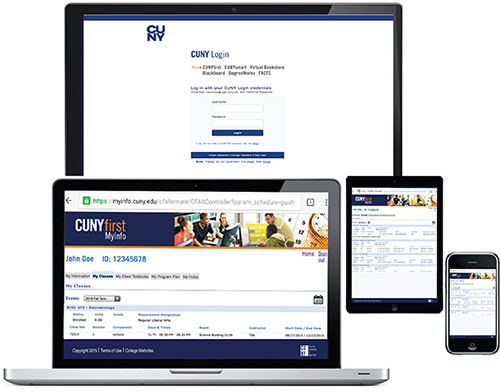
CUNYfirst MyInfo provides the CUNY community an important tool to quickly look up information for the start of the semester. Faculty members can find their class schedule and roster information without going on CUNYfirst. Students can find information such as class schedules, assigned textbooks, current program status and any holds, and financial aid information.
As with most other enterprise applications, you can now access CUNYfirst MyInfo using your CUNY Login rather than your portal credentials. This log-in change is part of CIS’s effort to provide access to all University-wide applications through a single set of credentials.
You can find links to the web-based CUNYfirst MyInfo offering on the Technology Services pages, Blackboard, the CUNYfirst home page, and from https://myinfo.cuny.edu. Mobile versions of CUNYfirst MyInfo are also available for iOS and Android; be sure to select Version 2 to use your CUNY Login credentials.
CUNY Virtual Bookstore Now at 18 Colleges

In Spring 2019 the CUNY Virtual Bookstore was rolled out at four additional colleges - the Graduate Center, Craig Newmark Graduate School of Journalism, Macaulay Honors College, and the School for Labor and Urban Studies. Joining the 14 existing colleges, there are now 18 colleges using CUNY’s Virtual Bookstore operated by Akademos, Inc.
Other upgrades have been recently launched this past term. In addition to updating capabilities to indicate usage of Open Educational Resources, the Virtual Bookstore now accepts Apple Pay, Google Pay, and PayPal. Also, for courses with multiple instructors, every instructor’s name assigned to a course now displays in the portal.
Faculty members who are new to the CUNY Virtual Bookstore can learn about selecting and submitting their selections for books and other course materials through a helpful instructional video.
17th Annual CUNY IT Conference
On November 29 and 30, 2018, CUNY held the 17th annual CUNY IT Conference at the John Jay College of Criminal Justice. The theme this year was “Technology and Education: Challenges and Opportunities.”
The conference provides faculty and staff with the ability to learn about the latest technologies in the field, as well as hearing from colleagues on their challenges, solutions, and best practices. The conference included 50 panels, ranging from role-playing games as part of the pedagogical toolkit to web-based virtual hospitals used for training.
“Fast facts” on 17th Annual CUNY IT Conference:
- Total number of attendees – 828
- administrators/IT staff – 600
- faculty/academic – 228
- Total number of panels - 50
- Total number of vendor tables – 40
More information can be found at: https://events.govtech.com/CUNY-IT-Conference.html